背景
最近在使用golang通过cgo生成动态链接库时, 由于项目较多,很难记住当前使用的库的位数。
接下来就来介绍一下如何查看库是32位还是64位。
linux
使用file命令查看库的位数。
64位结果为:
1
|
test.so: ELF 64-bit LSB shared object, x86-64, version 1 (SYSV), dynamically linked, BuildID[sha1]=8e8a0749c8efc6829f597e59eaba793513baf4a8, not stripped
|
32位结果为:
1
|
test.so: ELF 32-bit LSB shared object, Intel 80386, version 1 (SYSV), dynamically linked, BuildID[sha1]=8e8a0749c8efc6829f597e59eaba793513baf4a8, not stripped
|
windows
- 使用
file命令查看库的位数。
32位结果为:
1
|
test.dll: PE32 executable for MS Windows (DLL) (console) Intel 80386 32-bit
|
64位结果为:
1
|
test.dll: PE32+ executable for MS Windows (DLL) (console) Mono/.Net assembly
|
- 使用
Nodepad++打开test.dll文件
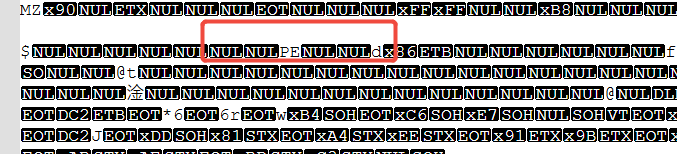
在第二行找到PE,然后后面的L是 32位,d是64位。
32位结果:
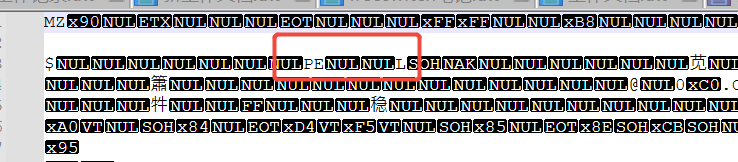
64位结果: